

How to configure screen resolution of windows 7
1. คลิกขวาที่บน Desktop -> เลือก screen resolution 2. เลือก resolution เป็น 1920×1080 และคลิก OK 3. คลิก keep changes
How to configure screen resolution of windows 7 Read More »

1. คลิกขวาที่บน Desktop -> เลือก screen resolution 2. เลือก resolution เป็น 1920×1080 และคลิก OK 3. คลิก keep changes
How to configure screen resolution of windows 7 Read More »
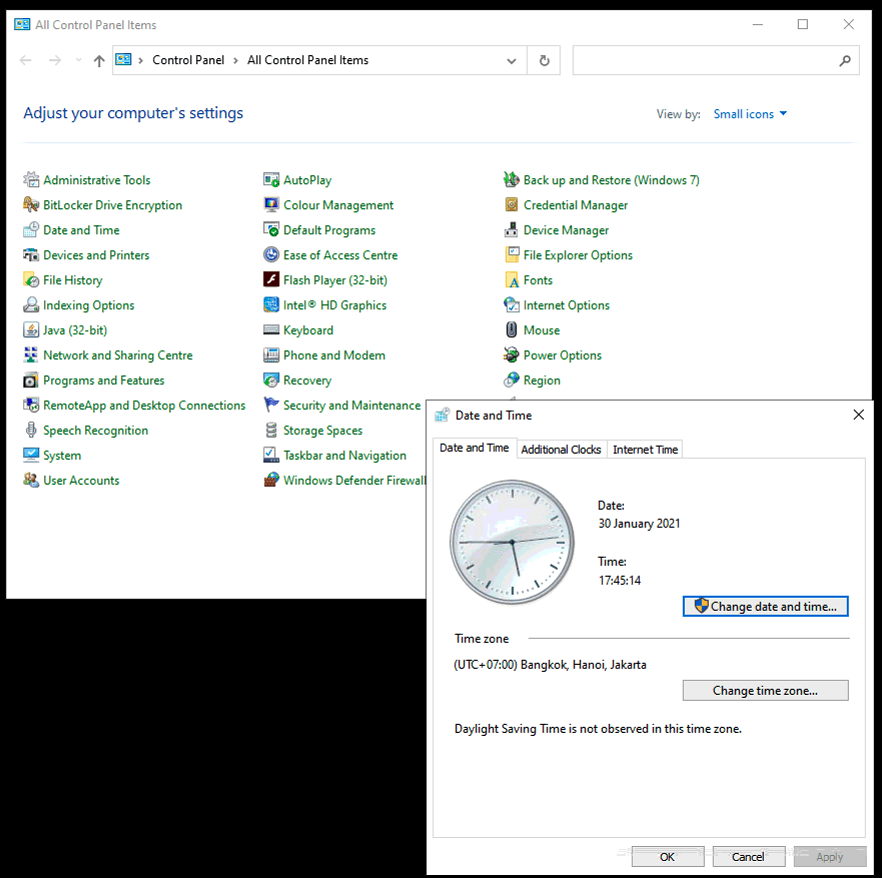
Setup Date And Time Format สำหรับงานระบบในไทย 1. เปิด control panel และคลิก “region and language” (หมายเหตุ: ให้เลือก view by เป็น large icons ) 2. คลิกที่ tab “time” -> ตั้งค่า short time เป็น HH:mm:ss 3. คลิกที่ tab “date” -> ตั้งค่า short date เป็น dd/MM/yyyy -> คลิก ok
How to configure date time format of Windows Read More »
Auto Logon Windows 7 Click on Start and then enter the following command in the search box: netplwiz Press the ENTER key. This command will load the Advanced User Accounts Control Panel applet. In the Users tab, uncheck the box next to Users must enter a user name and password to use this computer. Click
How To Automatically Logon To Windows 7 Read More »
Cr.http://support.microsoft.com/en-us/kb/315231 Method 1 Note To learn more about how to edit the registry before you proceed to use this article, click the following link to go to the article on the Microsoft website: http://technet.microsoft.com/en-us/library/cc755256.aspx You can use Registry Editor to add your logon information. To do this, follow these steps: Click Start, click Run, type regedit, and then click OK.
Solution Autologin Windows XP Read More »
1. เปิด control panel และคลิก “network and sharing center” (หมายเหตุ: ให้เลือก view by เป็น large icons ) 2. คลิก “change adapter setting” 3. ดับเบิลคลิกที่เน็ตเวิร์คพอร์ตที่ต้องการตั้งค่า IP address 4. ดับเบิลคลิกที่ “internet protocol version 4 (TCP/IPv4) 5. เลือก “use the following ip address” ตั้งค่า IP address และ subnet mask และคลิก ok 6. คลิก close
How to configure IP address of windows 7 Read More »
รายละเอียด สาย และ หัว FO connectorเวลาเลือกใช้ต้อง พิจารณาดังนี้ 1. ระยะทางเท่าไหร่ มีการระบุชนิดสายหรือไม่ว่าเป็น Single Mode FIber (FO-SM) หรือเป็น MultiMode Fiver (FO-MM)2. ชนิดของหัว ที่จะใช้ต่อทั้ง 2.ด้าน แบบที่นิยม ส่วนใหญ่ จะเป็น หัวST รองลงมา LC(Duplex) และนานๆ พบว่าจะใช้เป็น FC และ SC ตามลำดับ 3. ขนาดของแกน core ที่เป็น เนื้อFiber optic ถ้า Multimode มี เลือก ระหว่าง 62.4/125 หรือ 50/125 ส่วน Single mode มี 5/125 หรือ 9/125 ซึ่งขึ้นอยู่กับ
Accessory : Fiber Optic Cable and connector Read More »
สำหรับ Dongle หรือ USB License ที่ยังไม่ได้ activate มาเมื่อ Run iGcomms.exe จะไม่สามารถเห็น License Code ของ iControl ได้ เนื่องมาจาก Dongle USB key ตัวนั้นยังไม่ได้ activate (put code license into Dongle key) จำเป็นจะต้อง ดำเนินการ get file ดิบ หรือ dongle information เพื่อ save เป็น file แล้วส่งให้ supplier (igrid) เพื่อเอา file นั้นไป generate file สำหรับ activate dongle (อันนี้ไม่ใช่ License fileที่คุยอยู่นี้เป็นการ activate
iControl Dongle; How to activate Dongle (iGrid) Read More »
This content is restricted to subscribers
How to ; iRTUe Upgrade PIC firmware Read More »
iRTU from Factory จะมาด้วย default IP IP address 192.168.1.100 Subnet mask 255.255.255.0 Default gateway Note(17Oct2017): Special iRTU Lot จะส่งมาด้วย IP IP address 192.168.0.90 Subnet mask 255.255.255.0 Default gateway 192.168.0.99
DIM iRTU; Configuration Parameter Read More »
“Ping” Command Ping Command เหมือน เป็นการทดสอบ การตอบสนองอุปกรณ์ network เหมือนโยนปิงปอง (Ping) ไปแล้ว ถ้า IP นั้นไม่มีอยู่หรืออุปกรณ์ปลายรับปิงปองไปแล้ว ก็ จะ no response (timeout) แต่ถ้าปรกติก็จะส่งกลับมา Ping ไม่ใช่ TCP ไม่ใช่ socket หรือ Forward port Ping ถ้าจะทดสอบต่อเนื่อง ใช้ “ping xxx.xxx.xxx.xxx -t “ Ping ถ้าต้องการทดสอบระบบสื่อสารให้ Ping ด้วย data byte ที่สูงขึ้น เพื่อให้ มีก้อนข้อมูลมากขึ้น “ping xxx.xxx.xxx.xxx -l 1000” Command
How to use cmd (command line) windows Read More »